TABLE OF CONTENTS
Overview
“Pre‑Selected on Create Visit” allows you to define which tracking methods are automatically selected when creating a visit for a specific Outreach. This gives you more flexibility by configuring defaults at the Outreach level instead of applying them globally.
Prerequisites
Tracking methods must already be created under Settings > Tracking Methods.
- You must have permission to create or edit Outreaches.
Understanding Tracking Method Defaults in New Visits
Pre-selected tracking methods are automatically checked
When a tracking method is selected in an Outreach configuration, it is automatically checked in the Pre-selected on Create Visit section and will appear as checked when creating a new visit.
Steps to enable:
- Navigate to Manage > Outreach and create an Outreach or edit an existing outreach.
- Select the desired tracking method/s and click Save.
- Notice that the “Pre-Selected on Create Visit” section automatically checks the tracking methods you selected. Leave these checked if you want them to be automatically selected when creating a new visit. Uncheck them only if you do not want them pre-selected by default.
- Go to the New Visit (or Calendar) tab, select the Outreach, and search for a guest to create a new visit.
- Notice that the tracking methods selected in the Outreach configuration are already checked on the Create New Visit page.
Click the GIF to expand it into a larger view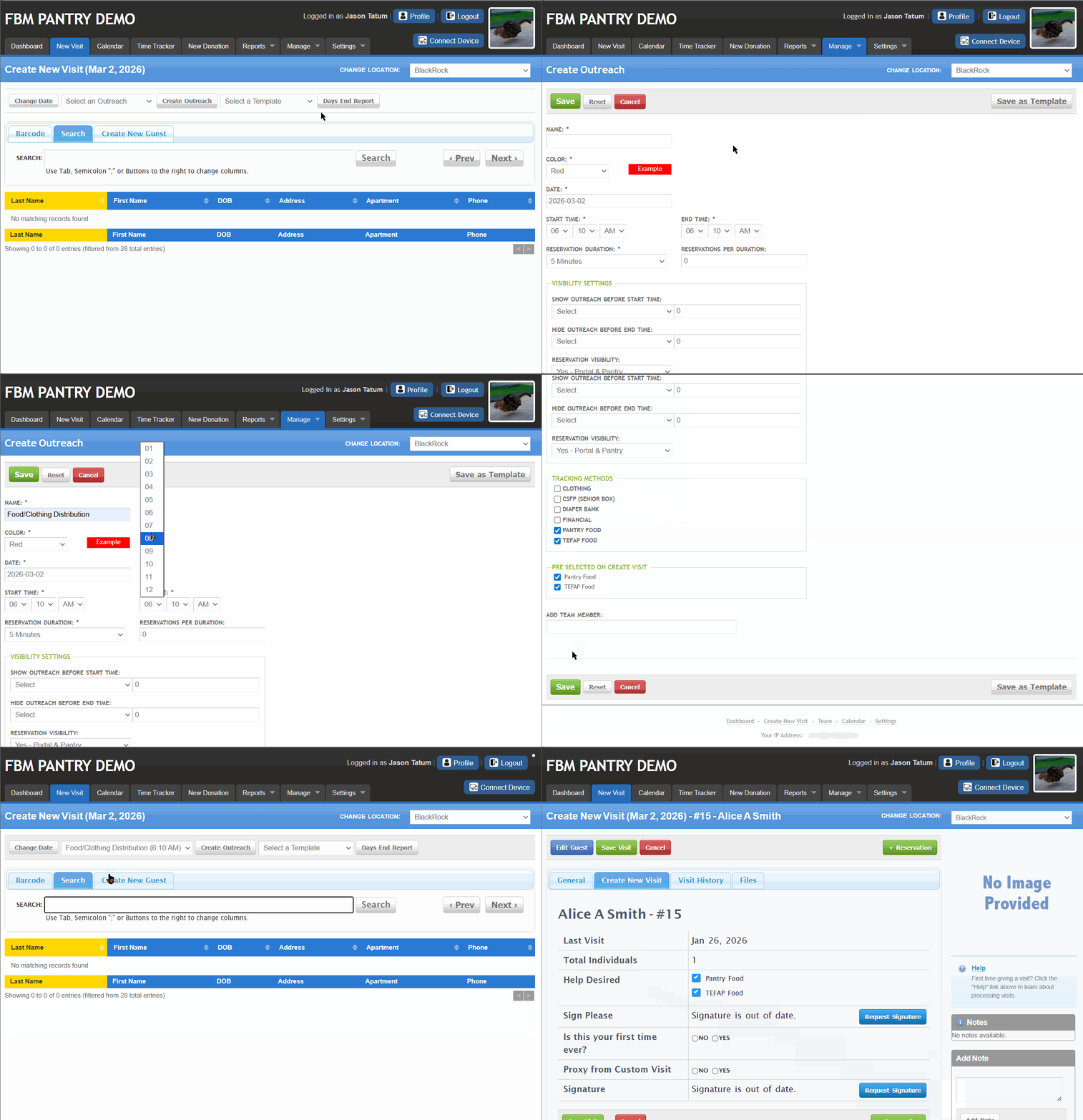
Tracking Methods You Uncheck Will Not Be Pre-Selected
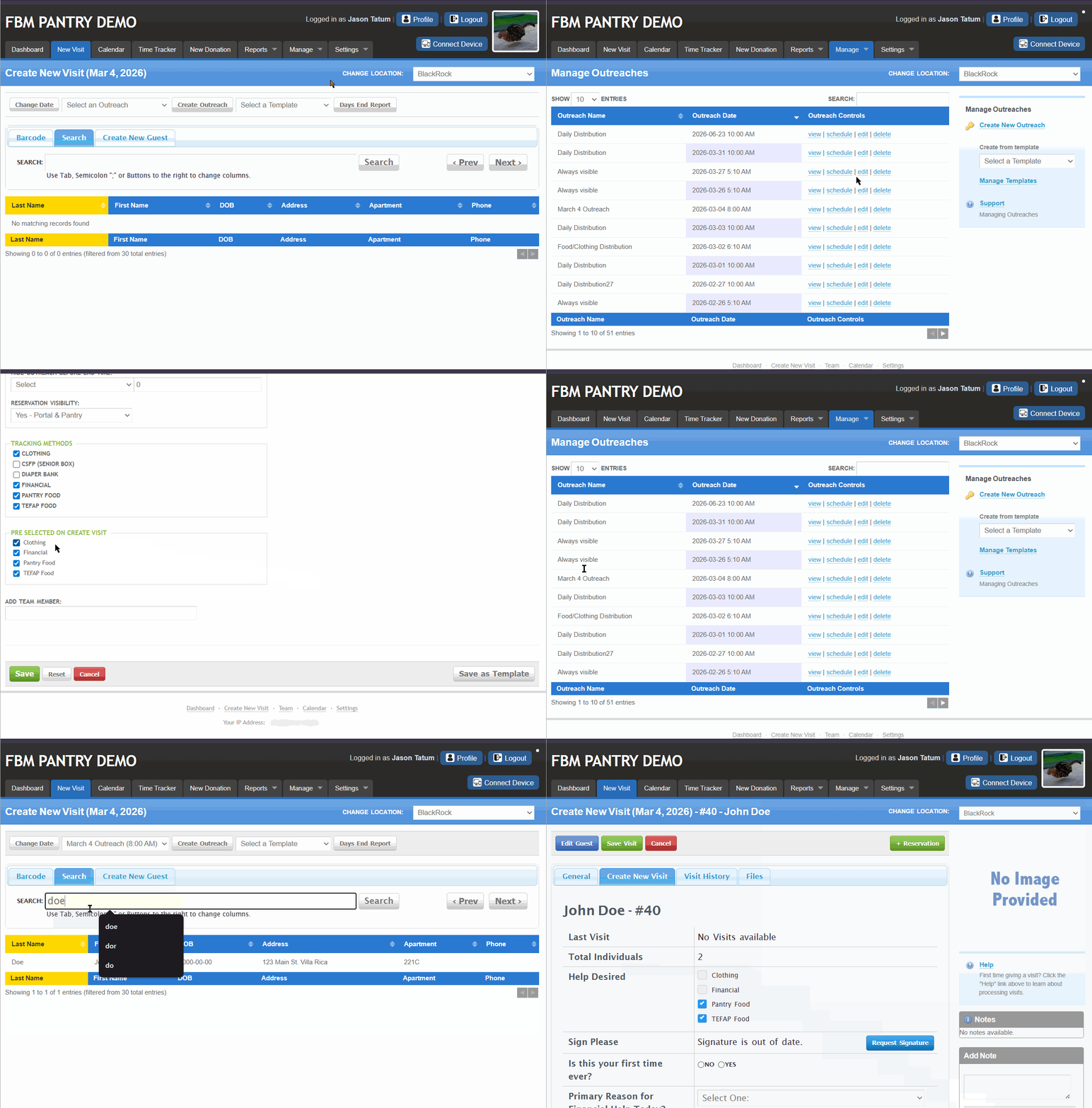
When a tracking method is unchecked in the Pre-selected on Create Visit section of the Outreach configuration, it will remain unchecked when creating a new visit.
Steps:
Navigate to Manage > Outreach and create or edit an Outreach.
Uncheck one or more tracking methods in the Pre- selected on Create Visit section and click Save.
Go to the New Visit (or Calendar) tab, select the Outreach, and search for a guest to create a new visit.
Notice that the unchecked tracking methods are also unchecked on the Create New Visit page
Reservations Overrides Pre-selected Tracking Methods
When a reservation is created internally and specific tracking methods are selected, the system uses those selections when creating the visit, ignoring the Pre-selected tracking methods set in the Outreach configuration.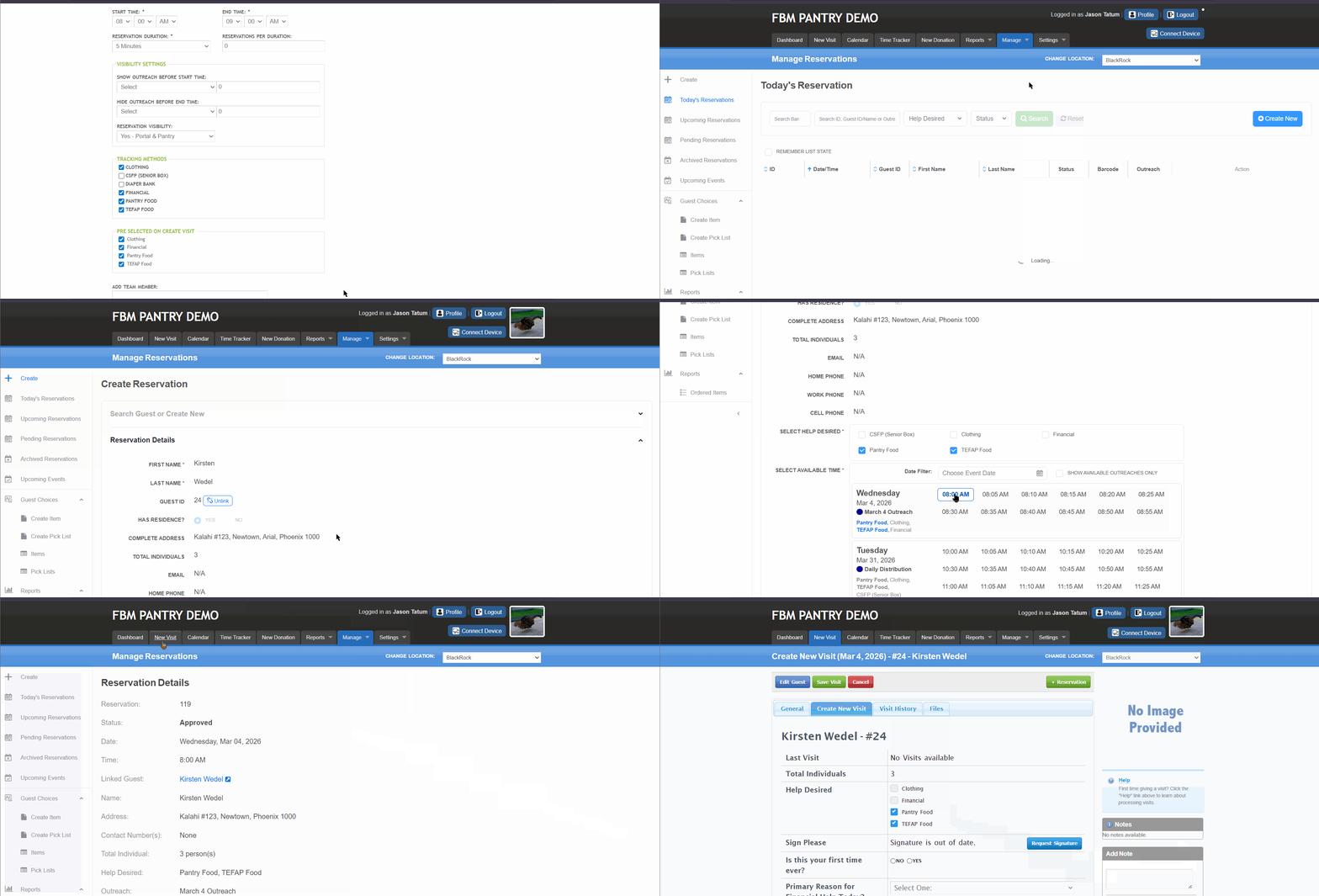
When a visit is created from that reservation, the system uses the tracking methods selected in the reservation — not the pre-selected tracking methods set in the Outreach configuration.
FAQs / Troubleshooting
I don’t see any tracking methods to select.
Make sure tracking methods are created first under Settings > Tracking Methods.Do these settings affect other Outreaches?
No. Pre‑selected tracking methods are applied only to the specific Outreach you configure.What happens if I uncheck this setting in the Outreach?
The tracking method will no longer be pre-selected when creating a visit for that Outreach. You can still manually select or modify tracking methods for individual guests during visit creationWhy doesn’t my guest’s full visit history appear when creating a new visit?
When creating a visit, FBM only shows visit history related to the selected Outreach and its Tracking Methods. To view all visits across all Outreaches, go to Manage > Guest > Visits.Why are visits from other Outreaches not visible?
Each Outreach uses its own Tracking Method configuration. Visits from different Outreaches are intentionally excluded from the Outreach-specific view.Will changing Outreach settings affect past visits?
No. Changes to Outreach configurations—such as adding Tracking Methods or enabling pre-selection—apply only to future visits and do not modify previously completed visits.Why doesn’t the Update Visit button appear?
The Update Visit button appears only if either Total Individuals or Age Group Edit is added in the Create Visit configuration, and if at least one Custom Visit Field is also enabled.When does a reservation override Outreach tracking methods?
The system uses the tracking methods saved in the reservation, even if different tracking methods are pre-selected in Outreach.
If I update Outreach settings, will it change existing reservations?
No. Updating Outreach settings does not update existing reservations. Reservations keep their originally selected tracking methods.
Was this article helpful?
That’s Great!
Thank you for your feedback
Sorry! We couldn't be helpful
Thank you for your feedback
Feedback sent
We appreciate your effort and will try to fix the article