TABLE OF CONTENTS
- Using Barcodes
- Types of Scanners and Cost
- Barcode Cards and Costs Associated
- Client Patterns - New Vs. Returning
Using Barcodes
Barcodes offer the fastest way to check in returning guests, but it’s important to determine whether they’re the right fit for your pantry. Below are a few key points to consider when making this decision.
Barcodes are simple to set up and use. If the barcode feature is not yet enabled, go to Settings → Settings → Create Visit and set Barcode Search to Show. In this same tab, you can also configure different workflows for custom barcode use.
To add a barcode to a guest record:
Open and edit the guest record.
Click inside the Barcode field.
Scan an unused barcode card from your stack.
The barcode number will automatically populate in the guest record.
Save the record and give the card to the guest.
To recall a guest record:
Scan the returning guest’s barcode card.
The system will locate and open the guest’s record automatically.
Process the visit as usual, click Done, and proceed to scan the next card.
Note: It is important to know that barcodes entered into guest accounts must be unique. Two guest records cannot contain the same barcode number. Do not worry, FoodBank Manager will let you know if you try.Types of Scanners and Cost
There are two types of scanners you can use, the 1D scanner and the 2D scanner.
1D Scanner
 This type of scanner is one of the most affordable options, typically starting at around $25 to $40 USD. Barcode scanners come in several styles — gun-style, wand, Bluetooth (wireless), and swipe models.
These scanners are used to read barcodes similar to the image shown
on the right. Each barcode generally contains eight digits, which link directly to a guest record when scanned.
The most common barcode format used is EAN-8.
This option is both easy to set up and simple to use, making it ideal
for pantries using FoodBank Manager for guest check-ins.
2D Scanner
 This scanner is a bit pricey starting at $350. These scanners scan the two-dimensional barcodes that you would see on a delivery label or the barcode on the back of a driver's license. The information on a 2D barcode contains a lot of information, separated by control tags. These tags are used by special software to parse out the data and insert the data into the correct form field. This option is complex and requires some knowledge.
Barcode Cards and Costs Associated
There are two basic ways to procure barcode cards. The first option is to purchase them preprinted. The second option is to print them yourself in-house.
Purchase Pre-printed Cards
Doing an internet search you can find many vendors that will be able to print barcoded cards. You can use keytags (shown here) or full size cards which are about business card size. Also, you can contact your local printer to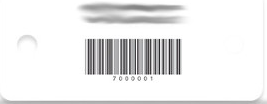 inquire if they can provide you with a barcoded card. If you go this route make sure that when you reorder, you order cards that are numbered past the range of the first order. Example: On your first order, you order cards numbered 1 through 1000, your second order should start at 1001.
Print Cards In-house
There are two basic options when printing your own cards.
- Purchase a card printing system that comes with a printer and the software that allows you to create your own cards. This is the most expensive option as you must purchase the printer, ink, card blanks in addition to the time to print out the cards.
- A more economical alternative would be to purchase a third party addon for Microsoft Word that will provide you with barcode fonts. Using mail merge and a merge file, print the barcodes and barcode numbers to labels. Affix the printed labels to your pantries business cards. This involves a package of labels and your volunteer's time to assemble.
Client Patterns - New Vs. Returning
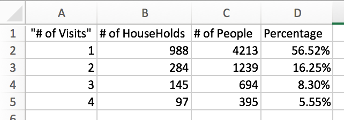 You need to determine if you have a high new client rate or if you have a stable base of the same clients. The chart on the right is data from an actual pantry where they allow their guests two visits per month or twenty-four potential visits in a year. The chart reflects that 56.52% of the guests came only once that year. Considering the percentages that came one, two or three times a year assists in the decision regarding the use of barcodes. FoodBank Manager has a 'Visit Frequency Report' that may be beneficial in assisting you in this decision.
Was this article helpful?
That’s Great!
Thank you for your feedback
Sorry! We couldn't be helpful
Thank you for your feedback
Feedback sent
We appreciate your effort and will try to fix the article